
How to use the OXVA authenticity code
The authenticity code is a helpful check when you want to confirm whether an OXVA product looks legitimate, but it only works well when you use it calmly and treat it as one part of the wider picture.
Start by finding the code on the packaging, reveal it carefully, follow the official verification route and then judge the result alongside the packaging quality, the device or pod finish and the seller you bought from.
A clean code result is useful. It still does not replace common-sense checks on the product and the source.
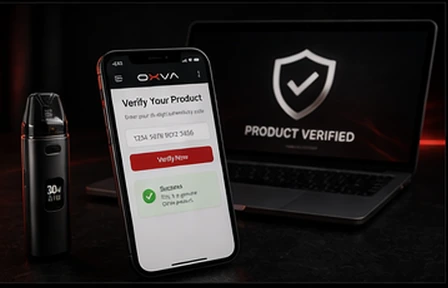
- Find the code
- Reveal it carefully
- Check the result
- Compare with visual signs
Quick answer: what the authenticity code is actually for
Use the code to add confidence, not to switch your brain off. It is one check, not the only check.
Find it on the packaging
The code is usually presented on the box or a dedicated verification label rather than on the device body itself.
Reveal it carefully
Scratch too aggressively and you can damage the code, which creates avoidable confusion.
Use the official route
Always check it through the proper verification process rather than trusting random screenshots or seller claims.
Cross-check the product
If the packaging, print quality or fit still feels wrong, do not ignore that just because the code looked fine.
How to use the code properly
The safest approach is slow and boring, which is exactly what you want here.
Step-by-step
- Check the box and find the authenticity label before opening everything in a rush.
- Reveal the code carefully so you do not damage characters you may need to read.
- Enter or check the code through the official verification route.
- Read the result calmly rather than assuming every message means the same thing.
- Compare that result with the packaging, finish and seller quality.
What the code can and cannot do
- It can help confirm whether the packaging information looks legitimate.
- It cannot fix suspicious packaging or a poor-quality product in your hand.
- It cannot make an unreliable seller automatically trustworthy.
- It is less useful if the scratch panel is damaged or unreadable.
- It should not be your only test if multiple things already feel off.
When a result still deserves caution
Even if the code seems straightforward, the product still has to make sense in the real world.
The packaging looks poor
Weak print quality, odd fonts or awkward labels still matter, even if the code check does not alarm you immediately.
The fit or finish feels wrong
A loose pod, rough finish or generally cheap feel should push you toward a fuller verification check.
The seller feels unreliable
If the buying source already felt questionable, treat the code as supporting evidence rather than a complete answer.
What to do if the code will not verify cleanly
You do not need to jump straight to a dramatic conclusion, but you should stop treating the product as settled.
Re-check the entry
Slow down and make sure the scratched characters have been read correctly before assuming the result itself is the problem.
Inspect the full product again
Look again at the packaging, seals, pod or device finish and the general quality signals you may have skipped the first time.
Use the broader support pages
Move to the genuine-check and support FAQ pages if you need a steadier next step than repeating the same code check.
Best next page based on what feels wrong
Once you have checked the code, the next guide should match the kind of doubt you still have.
Visual doubts about the full product
Use the broader genuine-product guide when the concern is no longer just the code itself.
Specific pod worries
Use the fake-pods guide if the main concern is whether XLIM pods look badly made or suspicious.
Still unsure what to do next
Use the warranty and support FAQ when you need a calmer route through the next steps.
Common questions about the OXVA authenticity code
Quick answers for people checking whether a product looks genuine.
Where is the OXVA authenticity code usually found?
It is usually on the product packaging in a scratch-off area or verification label, not hidden inside the device itself.
Is the authenticity code enough on its own?
No. The code is a useful check, but it should be used alongside packaging, print quality, fit and seller checks.
What should I do if the code result looks wrong?
Stop and review the full product carefully, including the box, the finish and the place you bought it from, before carrying on using it.
What if the scratch panel is damaged?
Treat that as a reason to be more cautious and use the broader genuine-product checks rather than relying on the code alone.
Can a good code result overrule poor packaging or a bad fit?
No. If the real-world signs still feel wrong, take those signs seriously instead of trying to explain them away.
Use the code, then trust the full set of signals
The most sensible verification comes from combining the code result with the packaging quality, product finish and buying source. If those signals still do not line up, keep checking before you assume everything is fine.
STILL HAVE A QUESTION?
Our community is active in the Manuals & Warranty Forum - get a real answer from real OXVA users.
Genuine OXVA — official UK stockist Vapestore
Vapestore is an authorised OXVA retailer. Every device includes a genuine authenticity code. 18+ only.
Still not sorted? Ask in the community
Real OXVA users answer questions every day in our community forum - device issues, pod advice, liquid recommendations and more. Post your question and get a reply from someone who's had the same problem.