
How to Lock & Unlock Your OXVA XLIM
Lock or unlock your OXVA XLIM in 5 seconds flat. Four quick taps on the fire button toggles the lock. Works on every XLIM model.
How to Lock Your OXVA XLIM
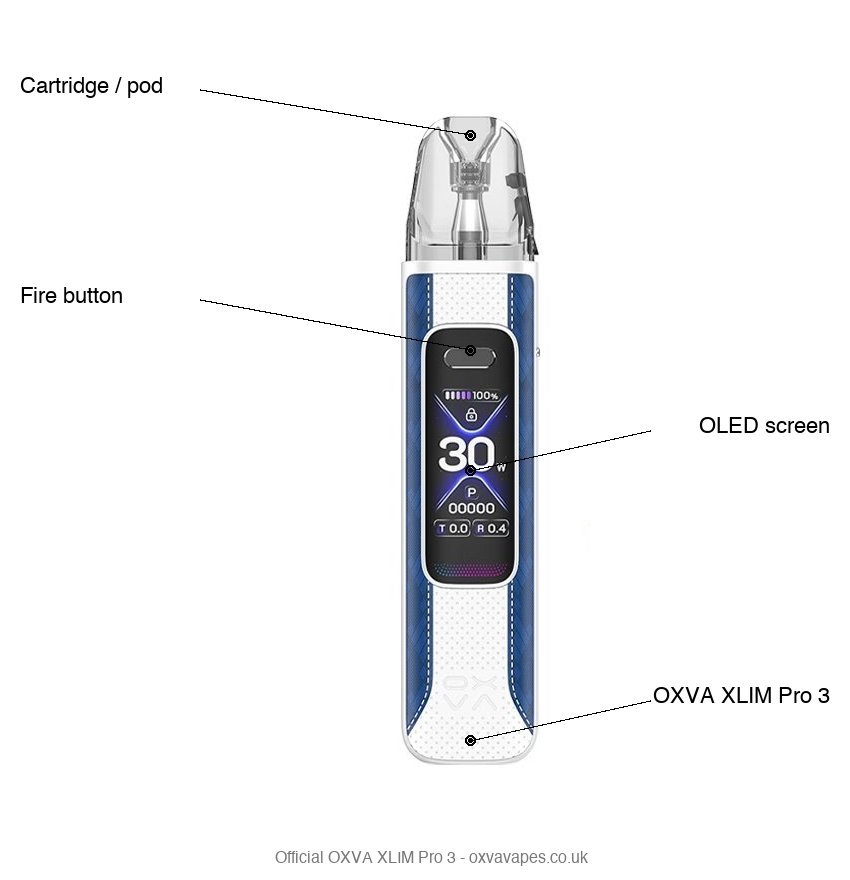
- Press the fire button 4 times within 3 seconds.Quick taps, not holds. The device will vibrate or the screen will flash to confirm the lock is set.
- The device is now locked.If you press the fire button once, the screen will briefly show a lock icon (on screen models) or the LED will flash once (on LED-only models) - but no vapour will be produced.
- Lock before putting it in your pocket.This prevents accidental misfires that waste battery and can overheat the device against your leg.
How to Unlock Your OXVA XLIM
- Press the fire button 4 times within 3 seconds.Exactly the same as locking. The 4-click sequence toggles the device between locked and unlocked.
- The screen or LED confirms the unlock.On XLIM Pro 3 the display will light up showing your current wattage. On Go 2 and Go Lite the LED blinks a confirmation pattern.
- Test with a draw.Inhale or press the fire button once. If vapour is produced, the device is unlocked and working normally.
How to Know if Your OXVA is Locked
XLIM Pro 3
Pressing fire once shows a padlock icon on the display. The wattage is not shown, and no vapour is produced.
NeXLIM
The official NeXLIM manual has no separate lock feature - the 5-click sequence turns the device on and off rather than locking it. Powering it off has the same practical effect as locking.
XLIM 3 Ultra
Uses a touchscreen with its own slide-lock control rather than the fire-button click pattern - check the screen for a lock icon.
Go Lite
Pressing fire produces a single flash of the LED but no vapour. The LED does not stay lit as it does during normal use.
XLIM Go 2
This model has no physical fire button (auto-draw only). It is not confirmed whether it has a lock feature at all - check the device manual.
NeXLIM Go
This device has no lock feature at all, confirmed against the official NeXLIM Go manual. It has no fire button - only a push mode-adjust valve and a push airflow valve - and is always ready to draw.
Why You Should Always Lock Your OXVA
Protect battery life
Accidental misfires in a pocket can run down the battery significantly. A locked device prevents any unintended discharge.
Extend coil life
Accidental dry firing (when the pod is near empty) is damaging to the coil. Locking eliminates this risk.
Prevent overheating
A misfiring device in a tight pocket can get uncomfortably hot. Locking is a safety habit, not just a battery-saving one.
Frequently Asked Questions
How to Turn Your OXVA On and Off
Turning an OXVA XLIM on and off uses the same quick sequence as unlocking it: five rapid presses of the fire button. Five clicks powers the device on, and five more powers it off. On the screen models (XLIM Pro 2, Pro 3, 3 Ultra and NeXLIM) the display lights up when it powers on and goes dark when off. On the LED-only models (Go 2 and Go Lite) the light flashes to confirm.
Turning your OXVA on
- Press the fire button five times quickly.
- The screen or LED lights up to confirm the device is on.
- You are ready to vape. If it is a brand new pod, let it sit filled for a few minutes first so the coil primes.
Turning your OXVA off
- Press the fire button five times quickly again.
- The screen goes dark, or the LED flashes and switches off.
- The device is now off and locked. It will not fire in a pocket or bag, which protects the battery and prevents accidental pocket burning.
If nothing happens after five presses, the battery may be flat. Charge it safely for a few minutes and try again.
Having Other Issues with Your OXVA?
The full troubleshooting guide covers burnt taste, leaks, charging problems and every OXVA error code.
STILL HAVE A QUESTION?
Our community is active in the XLIM Help Forum - get a real answer from real OXVA users.
Happy with your XLIM? Check you've got the right pods
The lock feature works perfectly when you're using the right pod resistance for your vaping style. If your draw still feels off after unlocking, a different pod resistance might suit you better — 0.8Ω for nic salts, 1.2Ω for a tighter MTL draw.